Hotkeys: Customizable Hotkeys for Basic Browser Actions
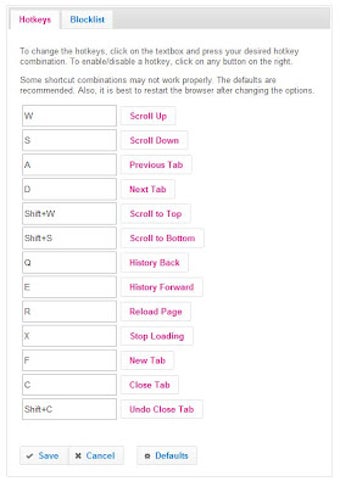
Hotkeys is a free Chrome add-on developed by owq that allows users to customize hotkeys for basic browser actions. With this extension, users can enable or disable hotkeys and change shortcuts according to their preferences.
To use Hotkeys, simply install the extension and it will only work on new or reloaded tabs that are web pages. Click on the icon in the location bar to disable or enable the extension for a specific page. To change options, go to Extensions and click on Options for this extension, or right-click on the icon in the location bar and select Options.
It is important to note that Hotkeys works by plugging JavaScript into the pages you load, so it cannot change system settings like disabling default hotkeys in Chrome. Additionally, it only works on tabs with actual web pages, and not every web page is compatible. Some shortcut combinations may also not work due to limitations that cannot be overcome.
Recent changes have been made to the extension, including bug fixes and improvements to the blocklist feature. However, the developer mentions that they won't be maintaining the extension much longer.
Overall, Hotkeys provides a convenient way to customize hotkeys for browser actions, giving users more control over their browsing experience.
[credit]Image: Pixabay[/credit]